How do I enable or disable my Lincoln vehicle's Wi-Fi Hotspot?
To enable the Wi-Fi® Hotspot* feature, follow the steps below.
To use your Lincoln vehicle's Wi-Fi Hotspot feature:
- Your vehicle must be equipped with a modem.
- Your vehicle must be equipped with Wi-Fi capabilities.
- Your vehicle's modem must be activated.
Note: Before using the Wi-Fi Hotspot feature, you must first set up a Wi-Fi data plan with AT&T. Your vehicle may be eligible for a complimentary 3-month or 3GB trial.
Turning Your Vehicle's Wi-Fi Hotspot On or Off
Select a dropdown below for steps to turn your Wi-Fi Hotspot on or off. If you need assistance determining the SYNC®** generation of your vehicle, use the SYNC Visual Reference Guide.
Experiencia digital de Lincoln
- Select the six-dot Apps Drawer icon on your vehicle's Digital Experience screen.
- Choose Hotspot.
- Connect your device to the vehicle's hotspot by scanning the code on the Digital Experience screen with your device or following the text instructions on the Digital Experience screen.
SYNC 4
- Select Settings on the SYNC screen.
- Scroll sideways and select Wi-Fi & Hotspot.
- Select the Vehicle Hotspot tab.
- Use the toggle to turn the Wi-Fi Hotspot on or off. Blue indicates on, and gray indicates off.
SYNC 3
- Select Settings on the SYNC screen.
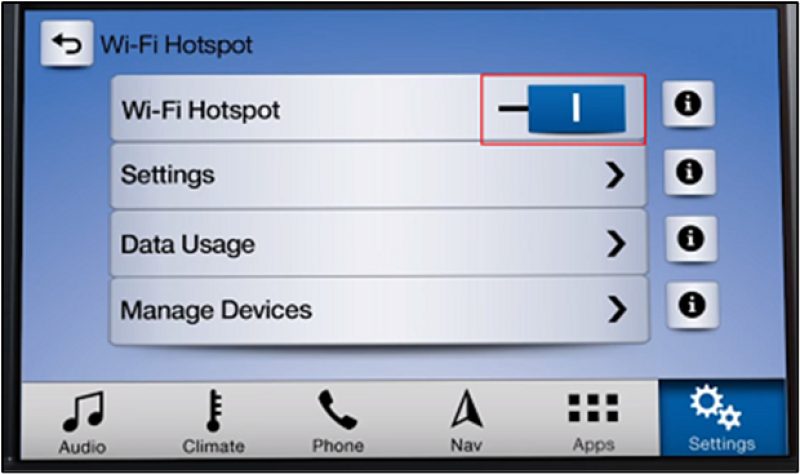
- Scroll sideways and select Wi-Fi & Hotspot. The following options display:
- Zona Wi-Fi
- Configuración
- Data Usage
- Manage Devices
Use the toggle to turn the Wi-Fi Hotspot on or off. Blue indicates on, and gray indicates off.
Información adicional
¿Cómo configuro un plan de datos para la zona Wi-Fi?
How do I find the password for my Wi-Fi Hotspot?
¿Cómo cambio la contraseña de la zona Wi-Fi?
Is my vehicle equipped with a Wi-Fi Hotspot?
How do I connect a device to the Wi-Fi Hotspot in my vehicle?
¿Qué hago si tengo problemas con la zona Wi-Fi de mi Lincoln?
*Wi-Fi® hotspot includes complimentary wireless data trial that begins upon AT&T activation and expires at the end of three months or when 3GB of data is used, whichever comes first. To activate, go to www.att.com/Lincoln. No conduzcas distraído o mientras tienes un dispositivo en la mano. Usa controles de voz.
**No conduzcas si estás distraído o usas dispositivos manuales. Usa sistemas operados por voz cuando sea posible. Algunas funciones pueden estar bloqueadas mientras el vehículo esté en cambio. No todas las características son compatibles con todos los teléfonos.
Wi-Fi es una marca comercial registrada de Wi-Fi Alliance®.