How do I view vehicle information and settings on my Lincoln's SYNC with MyLincoln Touch display?
The displays in the SYNC®* with MyLincoln Touch® instrument cluster provide vehicle information, such as fuel economy, and allow you to program vehicle settings. You can also view mileage, trip time, and distance-to-empty for two separate trips.
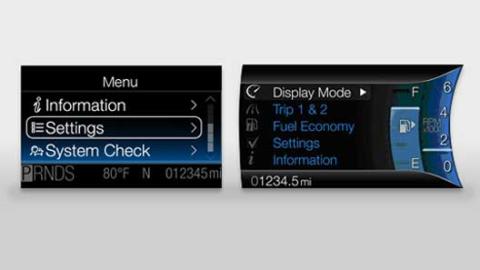
Accessing Vehicle Information Menus
Select a menu with the five-way controller on the left side of the steering wheel to navigate the menus and view data or change settings.
- Press the Up or Down arrow on the five-way controller to scroll through main menus.
- Press OK to enter a menu or confirm a setting.
- Press Left to return to the previous screen.
Note: Menus vary in vehicles with a single display.
Adjust Settings
Asistencia al conductor
| Vehículo
| Pantalla
|
Get Vital Information
- Vida útil del aceite
- Líquido del limpiaparabrisas
- Estado de los frenos
Track Fuel Economy
- Millaje por galón actual
- Millaje por galón durante un período determinado
Monitor Trips 1 & 2
- Odómetro de viaje
- Temporizador de viaje
- Distancia a tanque vacío
- Consumo de combustible promedio
Administer and Customize MyKey® Functions (if equipped)
- MyKey o Crear MyKey
- Velocidad máxima
- Advertencia de velocidad
- Limitador de volumen
- Eliminar MyKeys
- Reinicio del sistema
Información adicional
How do I install SYNC updates?
¿Cómo cambio las configuraciones de la pantalla SYNC?
Where can I find my Ford vehicle's specifications?
Where can I get an owner's manual?
*No conduzca si está distraído. Usa sistemas operados por voz cuando sea posible; no uses dispositivos portátiles mientras conduces. Algunas funciones pueden estar bloqueadas mientras el vehículo esté en cambio. No todas las características son compatibles con todos los teléfonos.