How do I set up Apple CarPlay in my Lincoln vehicle?
You can set up Apple CarPlay® with Lincoln Digital Experience* or SYNC®** by connecting your iPhone® (or iPad®) via USB or Bluetooth® (if enabled).
Setting Up Apple CarPlay
Importante:
- Ensure your vehicle is running and in Park (P) in an open, well-ventilated, and safe area.
- A recent device update may impact its connection to your vehicle. If you are experiencing pairing issues after following the steps below, try turning your device off, waiting 60 seconds, and turning it back on.
Select Lincoln Digital Experience or your SYNC generation from the drop-down options below to learn how to connect to Apple CarPlay. If you need assistance determining your system's generation, select the first drop-down option.
Note: Instructions may vary. Consulta el manual del propietario para obtener información específica sobre tu vehículo.
Identificar la generación de SYNC de tu vehículo
Selecciona un recurso en la siguiente tabla para ayudarte a identificar la generación de SYNC de tu vehículo.
| Resource | Indicaciones |
| Página de SYNC y actualizaciones de navegación | Either:
Tu generación de SYNC aparecerá en el lado derecho de la página bajo el encabezado "SYNC Actual Version". |
| guía de referencia visual de SYNC | Ver imágenes de ejemplo de generaciones de SYNC que Lincoln ha ofrecido. |
Experiencia digital de Lincoln
- Pair your Apple device with your Lincoln Digital Experience system.
- Select Start Apple CarPlay when the pop-up message appears on your vehicle's screen.
The initial setup is completed, and an Apple CarPlay icon will display on the left side menu of the touchscreen.
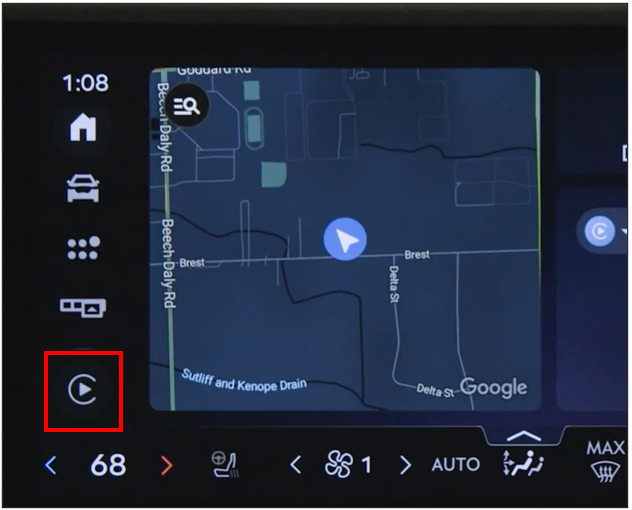
SYNC 4
- Pair your Apple device to SYNC.
- Select Enable when the pop-up message appears on your vehicle's screen.
The initial setup is completed, and Apple CarPlay will appear in your Apps menu.
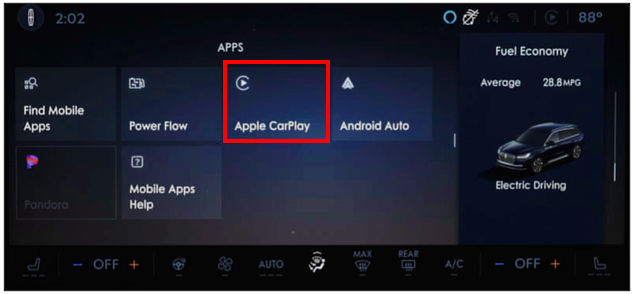
SYNC 3
- Enable Siri in your Apple device settings.
Note: Refer to your phone's operating manual or the manufacturer's website, as instructions vary by model.
- Plug the device into the vehicle's USB port with an Apple cable.
- Tap Continue on the pop-up window on your vehicle's SYNC screen.
- Read the Privacy & Terms of Use in the next pop-up window, and select Agree to accept.
- Press Allow on the device for SYNC 3 to complete the Apple CarPlay setup.
Apple CarPlay will automatically display on your SYNC 3 touchscreen.
Información adicional
¿Cómo desactivo Apple CarPlay on SYNC?
¿Qué vehículos Lincoln son compatibles con Apple CarPlay?
What should I do if I am having issues with Apple CarPlay?
*Algunas funciones de Lincoln Digital Experience requieren un plan de servicios conectados. No conduzcas distraído o mientras tienes un dispositivo en la mano. Usa sistemas operados por voz cuando sea posible. Algunas funciones pueden estar bloqueadas mientras el vehículo esté en cambio. No todas las características son compatibles con todos los teléfonos.
**Do not drive while distracted or while using handheld devices. Usa sistemas operados por voz cuando sea posible. Algunas funciones pueden estar bloqueadas mientras el vehículo esté en cambio. No todas las características son compatibles con todos los teléfonos.
iPhone, iPad, Apple CarPlay y Siri son marcas comerciales de Apple Inc. y están registradas en los EE. UU. y otros países.
La marca denominativa y los logotipos de Bluetooth® son marcas comerciales registradas propiedad de Bluetooth SIG, Inc. y cualquier uso de dichas marcas por parte de Ford Motor Company se realiza bajo licencia.